Hot-desking squeezes more work out of fewer square feet. Your cleaning plan needs the same efficiency.
This guide translates current public-health and workplace standards into a clear, after-hours program for small offices: what to clean, when to disinfect, how to stage shared desks, and how to protect electronics without leaving streaks.
It’s built for speed, repeatability, and a crisp morning handoff.
Clean vs. disinfect: set the right baseline
Cleaning removes soil and residues so surfaces look and feel fresh. Disinfecting uses products to kill germs on hard, non-porous surfaces.
In community settings like offices, the CDC advises routine cleaning of high-touch surfaces and targeted disinfection based on risk, always after a thorough clean so the chemistry can work effectively. Dirt and residues interfere with disinfectants, which is why the sequence matters.
Where disinfection belongs: shared touchpoints such as keyboards, mice, desk phones, chair arms, doorknobs, elevator buttons, and break-room faucets once visible soil is removed.
If your policy includes virus-focused products, choose items from EPA List N and honor the labeled contact time; EPA expects List N products to kill all strains and variants of SARS-CoV-2 when used as directed.
Ventilation multiplies your surface results
Air moves dust. Better ventilation and filtration reduce airborne particles that later settle on desks and equipment, which lowers the soil load your team must remove each night. CDC and EPA guidance emphasize ventilation as a core layer for reducing exposure to respiratory viruses in workplaces and offices.
Coordinate night cleaning with the building’s ventilation schedule so you get more outside air and filtration during and after service.
The after-hours route that finishes on time
1) Arrival and staging
- Walk the space to note spills, clutter, or access issues.
- Place wet-floor signs in break rooms and restrooms.
- Stage caddies by zone to cut footsteps.
2) Trash and recycling reset
- Empty all cans, tie liners, wipe container rims, and re-bag.
- OSHA sanitation rules require leak-proof, cleanable receptacles kept in sanitary condition.
- floors should be maintained as dry as practicable to reduce slip risk.
3) High-touch sweep (first pass)
- With a neutral cleaner, remove visible soil from door plates, switches, desk tops, phones, and chair arms before any disinfectant step. This reduces cross-contamination when you return with List N products.
4) Shared desks (hot-desk sequence)
- Clear disposables and items per the client’s Clean Desk Policy.
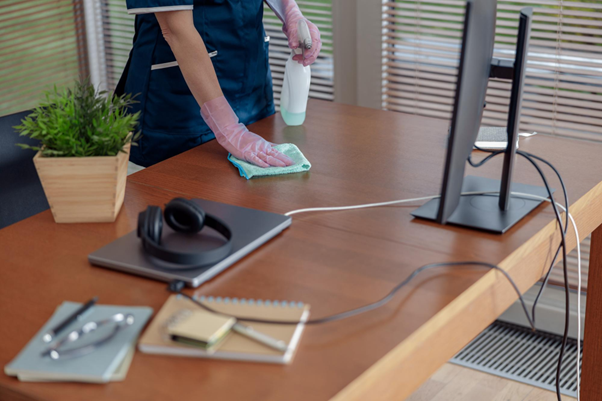
- Power down monitors if possible. Use electronics-safe wipes for keyboards, mice, headsets, and phone handsets; keep liquids away from ports and allow full air-dry.
- Clean non-electronic surfaces, then apply the chosen disinfectant and leave visibly wet for the labeled dwell time. Do not short-wet to speed up; the label time is tied to efficacy.
5) Restrooms
- Apply bowl cleaner and allow dwell while you clean dispensers, counters, fixtures, and door hardware.
- Descale sinks and polish stainless.
- Mop from the far corner to the exit, changing solution when soiled.
6) Break room / kitchenette
- Degrease counters and splash zones. Clean appliance exteriors and handles.
- For food-contact surfaces, clean before any sanitizing step and use food-appropriate chemistries with correct dilution. The “clean first” rule applies here too.
7) Floors (last)
- Vacuum edges and under workstations with a HEPA-equipped or CRI-rated vacuum to capture fine dust.
- Damp mop hard floors with a neutral cleaner; use a disinfectant only where policy or regulation requires.
Frequency by risk and traffic
- Shared desks and touchpoints: clean each service; disinfect per policy (daily for true hot-desking or during high respiratory-virus activity; less frequent in assigned-seat offices).
- Restrooms and break areas: every service, plus periodic descaling and grout detail.
- Conference rooms: after meetings or nightly when utilization is high.
- Quarterly detailing: chair bases, cable trays, vent grilles, cabinet tops, and undersides of sit-stand desks to prevent dust layers from feeding daily resettling.
Checklists that fit hot-desking
Shared desk (per station)
- Remove disposables and clear surfaces per policy.
- Clean: desk, chair arms/controls, monitor stand, under-desk supports.
- Electronics: wipe keys, mouse, headset, and phone with compatible wipes; allow to dry.
- Disinfect: desk, chair arms, phone keypad/handset, drawer pulls; verify contact time.
- Re-stage: keyboard centered, monitor angle neutral, chair tucked, cable clutter minimized.
Conference room
- Clean table, chair touchpoints, remotes, speakerphones, HDMI dongles, touch panels, and door plates.
- Disinfect per policy after cleaning.
- Finish with streak-free glass on boards and interior windows.
Break room
- Clean sinks, counters, tables, appliance handles, and refrigerator gaskets.
- Sanitize food-contact surfaces after cleaning with correct dilution and label guidance.
Electronics without the headaches
Night crews worry about damaging keyboards and screens. The simplest formula is manufacturer-approved wipes or 70% alcohol wipes for many office devices, light pressure, no pooling near ports, and full air-dry before power-up.
Pair this with a microfiber pass on bezels to avoid morning streaks. When a device list is available, add specific “OK to use” products to your scope so every technician follows the same rule set.
Ventilation, timing, and occupant comfort
Plan detail dusting before the building increases outside-air intake for the morning so particulates are captured during the overnight filtration cycle. Confirm that restroom and break-room exhaust fans operate during cleaning.
Ventilation is a key control that complements surface care by lowering the number of airborne particles that can resettle on desks and equipment.
Quality controls that suit small offices
- Photo standards: one model workstation photo helps teams match the same “ready to work” look every night.
- Color-coded microfiber: isolate restroom textiles from office textiles to prevent cross-use.
- Lot and expiry tracking: log disinfectant brand, lot, and expiration to support accountability.
- Residue fixes: if morning staff report tacky desks, swap to low-residue wipes or reduce liquid volume on non-porous surfaces while keeping dwell time intact.
Budgeting the program
In compact spaces, minutes are won or lost at the desk cluster. Standardize the hot-desk sequence, stage caddies close to work zones, and preload liners to reduce walking.
Bake contact times into “leave-to-dwell” moments, such as applying disinfectant on a conference table, then collecting trash while it stays wet. This preserves efficiency without stretching the shift.
Why teams in San Jose, Santa Clara, and Los Altos choose Freshy Cleaning
Freshy Cleaning turns guidelines into a smooth nightly routine. We map your floor plan, codify a shared-desk checklist in your profile, and send a consistent crew trained to hit every touchpoint without slowing tomorrow’s schedule.
Our after-hours teams follow CDC cleaning practices, choose EPA List N products with verified contact times, and align with OSHA housekeeping and waste requirements.
The result is a workspace that looks sharp at 8 a.m., feels healthier through the week, and respects your equipment. Ready for small-office care that performs like a big program?
Book a Freshy after-hours plan and walk into desks that are clean, staged, and ready to work.